



Have you ever thought about how your phone connects to your wireless earbuds, how computers in an office share the same Wi-Fi, or how you access a website hosted on the other side of the world? All of these activities depend on computer networks. A computer network simply connects two or more devices so they can communicate, exchange data, and share resources. The connection can be wired or it can be wireless, depending on the network as well as how it is being used.
However, not every network works in the same way or covers the same area. Some connect devices sitting a few meters apart, while others connect networks across countries and continents. This is where understanding the Types of Computer Network becomes extremely useful.
In this guide, we’ll look at the major types of computer networks, how they work, where they’re used, and how they differ from each other.
What Is a Computer Network?
A computer network is a group of connected computers, smartphones, servers, printers, and other devices that communicate with each other.
The main idea is very simple: devices connected to a network can share information and resources instead of working completely on their own.
For example, when several computers in an office use the same printer or share files through a common server, they’re using a computer network. Similarly, when you connect your laptop to your home Wi-Fi to browse the internet, you’re also using a network.
Networks can be classified in different ways, such as by the geographical area they cover, the way data is transmitted and who can access them.
Types of Computer Network Based on Geographical Area
One of the easiest ways to understand networks is by looking at how much physical area they cover. Based on geographical coverage, the main types are PAN, LAN, CAN, MAN, and WAN.
1. Personal Area Network (PAN)
A Personal Area Network, or PAN, is the smallest type of network. It connects devices that are close to one person, usually within a short range.
For example, when you connect your smartphone to wireless earbuds using Bluetooth, you’re creating a small PAN.
PANs can use technologies such as Bluetooth, NFC, and infrared. They are mainly useful for connecting personal devices and usually cover around 1 to 10 meters.
Example:
Your smartphone connected to your smartwatch, wireless earbuds, or laptop.
Common uses:
- Connecting personal gadgets
- Sharing data between nearby devices
- Connecting wireless accessories
2. Local Area Network (LAN)
You probably have already used a LAN without even realizing it.
A Local Area Network connects devices within a relatively small area, such as a home, school, office, or building. Ethernet cables and Wi-Fi are commonly used for LAN connections.
For example, the computers, printers as well as other devices connected to the same office network can communicate with each other through a LAN.
LANs are popular because they allow fast communication and make it easier to share resources such as printers, files, and internet connections.
Example:
The Wi-Fi network in your home or the internal network of an office.
Common uses:
- Sharing files
- Sharing printers
- Connecting office computers
- Sharing an internet connection
3. Campus Area Network (CAN)
A Campus Area Network, or CAN, is larger than a LAN but also smaller than a MAN.
It connects multiple LANs within a limited campus or group of nearby buildings. Universities, colleges, and large organizations can use CANs to connect different departments or buildings all under one network.
For example, a university may have separate networks for its library, administration building, computer labs, and different departments. A CAN can connect these networks together.
Example:
A university network connecting several buildings across the campus.
Common uses:
- Connecting university departments
- Connecting corporate buildings
- Sharing resources across a campus
4. Metropolitan Area Network (MAN)
A Metropolitan Area Network, or MAN, covers a larger area than a LAN or CAN. It generally connects networks across a city or metropolitan region.
MANs can use technologies such as fiber optics, microwave links, and Metro Ethernet.
Example:
A city-wide network operated by an internet service provider.
Common uses:
- Connecting offices across a city
- Providing city-wide connectivity
- Connecting multiple LANs in a metropolitan area
5. Wide Area Network (WAN)
A Wide Area Network, or WAN, covers a very large geographical area. It can connect networks across cities, countries, or even continents as well.
WANs use technologies such as leased lines, satellite links, and the internet to support long-distance communication.
The internet is the most familiar example of a WAN.
For example, when you access a website hosted on a server in another country, your request may travel through several networks before reaching the destination.
Example:
The internet.
Common uses:
- Connecting offices in different countries
- Long-distance communication
- Accessing cloud services
- Connecting geographically distant networks
Types of Computer Network Based on Data Transmission
Geographical coverage isn’t the only way to classify a network. Networks can also be grouped according to how data moves between devices.
Two important types are broadcast networks and point-to-point networks.
Broadcast Network
In a broadcast network, multiple devices share a common communication medium.
When one device sends data, the transmission can be received by other devices connected to that shared medium. Each device checks the destination information to determine whether the data is meant for it.
Traditional bus-based Ethernet and wireless LANs are examples associated with broadcast communication.
The basic idea is a one-to-many communication model.
Point-to-Point Network
A point-to-point network uses a dedicated connection between communicating devices.
Here, data moves from one device to another through a specific link. Depending on the network, data may also travel through intermediate routers or switches to reach its destination.
Leased lines and telephone networks are examples of point-to-point communication.
The basic idea is one-to-one communication.
Types of Computer Network Based on Ownership and Access
Networks can also be classified by who owns them and who is allowed to access them.
This gives us three common categories: private networks, public networks, and hybrid networks.
Private Network
A private network is controlled by an individual, organization, or institution. Access is normally limited to authorized users.
For example, a company may have an internal network that employees can access using passwords, authentication systems, VPNs, or other security measures.
Examples include:
- Office networks
- Corporate intranets
- Private cloud networks
The main advantage is greater control over who can access the network and its resources.
Public Network
A public network is available to a much wider group of users.
The internet and public Wi-Fi are common examples. Public networks are convenient, though they generally require users to take more care with security when accessing sensitive information.
Examples include:
- Public Wi-Fi
- The internet
- Mobile cellular networks
Hybrid Network
As the name suggests, a hybrid network combines private and public network environments.
For example, a company may keep its internal systems private while allowing certain services or resources to communicate through the public internet.
This approach is common in modern organizations that need both internal security and external connectivity.
Intranet vs Extranet
You may also come across the terms intranet and extranet while learning about computer networks. They are related to how organizations control access to their networks.
What Is an Intranet?
An intranet is a private network used within an organization. Only authorized people, such as employees, can normally access it.
Companies can use intranets for internal communication, document sharing, employee portals, HR systems, and other internal applications.
For example, an employee portal that can only be accessed by people working in a company can be part of its intranet.
What Is an Extranet?
An extranet extends some of an organization’s network resources to trusted external users.
These users could include suppliers, business partners, vendors, or customers. Access is limited and normally requires authentication and authorization.
For example, a company might give a supplier access to a specific portal to check orders or update supply information without giving them access to the entire internal network.
What Is an Internetwork?
An internetwork is formed when two or more independent networks are connected so they can communicate with each other.
In simple terms, it’s a network of networks.
The internet is the biggest and most familiar example. It connects countless individual networks and allows devices on different networks to communicate with each other.
PAN vs LAN vs CAN vs MAN vs WAN
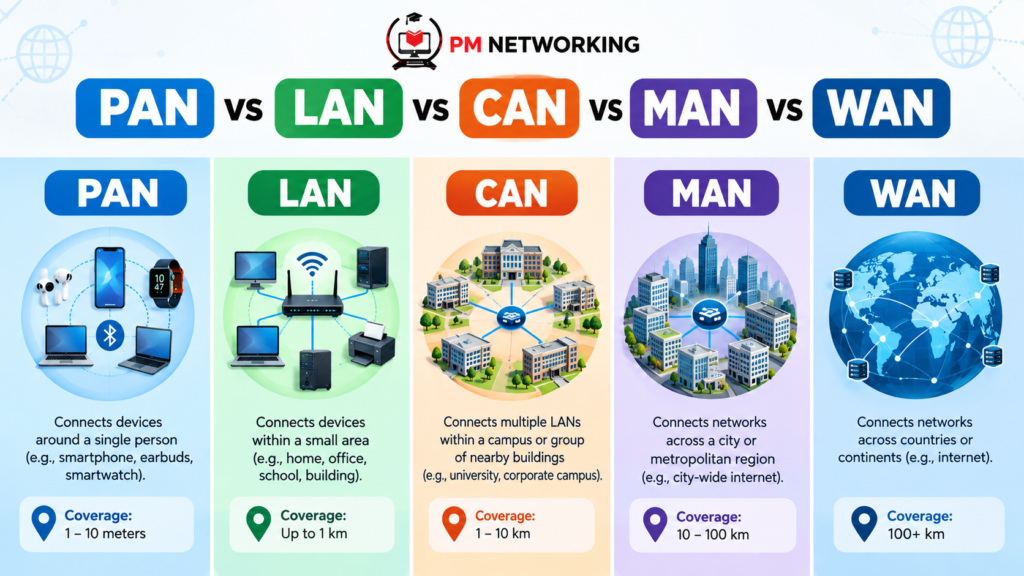
It can be confusing to remember all these terms at first. The easiest way is to compare them based on the area they generally cover.
| Network Type | Coverage | Simple Example |
| PAN | Very small/personal area | Phone + earbuds |
| LAN | Home, office, building | Office Wi-Fi |
| CAN | Campus or nearby buildings | University network |
| MAN | City or metropolitan area | City-wide network |
| WAN | Country, continent, or global | Internet |
The important thing to remember is that the size generally increases as you move from PAN to WAN. However, the exact boundaries can vary depending on how a particular network is designed.
Why Are Computer Networks Important?
Computer networks have become a basic part of everyday digital life.
They allow people and organizations to share data, communicate, access applications, and use resources from different devices. Without networks, services such as online banking, video calls, cloud applications, file sharing, and the web would work very differently.
Networks also make collaboration easier. A team can work on shared files, access common systems, communicate instantly, and connect with people in different locations.
For businesses as well, networks help connect employees, servers, applications, offices, and customers.
How Do You Choose the Right Type of Network?
There isn’t one network type that works for every situation. The right choice depends on factors such as the area you need to cover, the number of devices, security requirements, budget, and how the devices need to communicate.
If you’re connecting your phone to a smartwatch, a PAN is enough.
For a home or small office, a LAN is generally suitable.
If several buildings within a university need to communicate, a CAN may make more sense. For city-wide connectivity, a MAN can be used, while WANs are designed for much larger geographical areas.
So, instead of memorizing the names alone, try to understand why each network exists and what problem it solves.
Final Thoughts
Understanding the Types of Computer Network becomes much easier when you connect each type with its everyday use. PAN connects your personal devices, LAN connects devices in a limited location, CAN connects networks across a campus, MAN covers a city, and WAN connects networks across much larger distances.
There are also other ways to classify networks, including how data is transmitted and who has access to the network. Intranet, extranet, private, public, and hybrid networks are all useful concepts to know as well.
Once you understand these basics, topics such as network devices, IP addresses, routing, network security, and network protocols become much easier to follow.
FAQs
1. What are the main types of computer networks?
The main types include PAN, LAN, CAN, MAN, and WAN. They are mainly classified based on the geographical area they cover, though networks can also be classified by access, ownership, and how data is transmitted.
2. What is the difference between LAN and WAN?
A LAN connects devices within a small area such as a home, office, or school. A WAN covers a much larger area and can connect networks across cities, countries, or continents. The internet is the most common example of a WAN.
3. Which type of network is used in a home?
A home network is usually a LAN because it connects devices within a limited area. Your phone, laptop, smart TV, printer, and other devices can all connect through the same home network.
4. What is the difference between PAN and LAN?
A PAN is designed for connecting personal devices over a very short distance, such as a phone and smartwatch. A LAN covers a larger area and can connect many devices within a home, office, school, or building.
5. Why are different types of computer networks needed?
Different networks are designed for different communication needs. A PAN works well for personal devices, while a LAN suits homes and offices. Larger networks such as MAN and WAN are used when devices or smaller networks need to communicate across cities, countries, or larger geographical areas.
For learners planning to advance their networking careers, a CCNP Course can help build deeper knowledge of enterprise networking, routing, switching, security, and troubleshooting

PM Networking is an emerging leader in the ed-tech space, founded by Praphul Mishra in 2020 with a vision to democratize tech education. The journey of PM Networking began as a YouTube channel with the sole purpose of sharing valuable knowledge in the fields of Networking, Cyber Security, and Cloud Computing. What started as a humble effort to educate has rapidly evolved into a comprehensive online learning platform that caters to the growing demand for specialized IT skills. PM Networking stands out in the crowded ed-tech industry by providing affordable, world-class training tailored to the needs of aspiring IT professionals. The platform is dedicated to equipping learners with the skills and knowledge required to excel in the highly competitive tech industry. Whether it’s Networking fundamentals, advanced Cyber Security protocols, or mastering the complexities of Cloud Computing, PM Networking offers a range of courses designed to cater to different levels of expertise.
0 Comments