




If you have ever wondered why modern data centers feel so much faster than the networks of ten years ago, the answer is usually spine-leaf architecture. It is the design that almost every large data center now uses, and it is a core topic in any serious data center course. This guide explains what it is, how it works, and where it beats the older three-tier model, in plain language.
What is spine-leaf architecture?
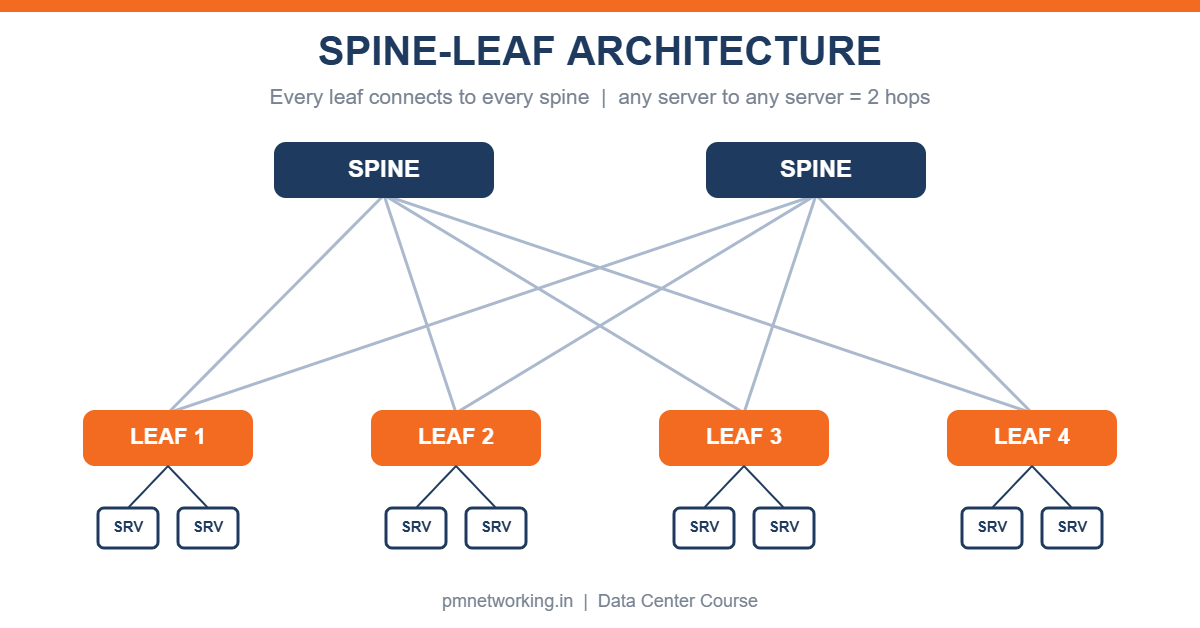
Spine-leaf architecture is a two-layer network design. The bottom layer is made of leaf switches, which connect to servers, storage and firewalls. The top layer is made of spine switches, which connect only to leaf switches. Every leaf switch has a link to every spine switch. That full mesh between the two layers is the whole idea.
How does it work?
Servers plug into a leaf switch. When one server needs to talk to a server on another leaf, traffic goes up from its leaf to any spine and straight down to the destination leaf. That is always exactly two switch hops, so latency is predictable. Leaf switches do not connect to each other, and spine switches do not connect to each other, which keeps the design simple. Because there are several equal paths (one per spine), the network uses ECMP, equal-cost multi-path routing, to share traffic across all of them instead of leaving some links idle.
Spine vs leaf: what each layer does
Leaf switches are the access layer. They face the servers and usually handle the Layer 2/Layer 3 boundary, policy and VXLAN tunnel endpoint work. Spine switches are the high-speed backbone. They do almost nothing except forward packets quickly between leaves. To add capacity you add more leaves for ports or more spines for bandwidth, and nothing else has to be redesigned.
Why data centers moved away from three-tier
The old design had core, aggregation and access layers. It was built for north-south traffic, meaning users talking to servers. Today most traffic is east-west, meaning servers talking to other servers for databases, virtual machines, containers and storage. In a three-tier network that traffic often climbs to the core and back, takes a different number of hops depending on location, and Spanning Tree blocks some links to avoid loops. Spine-leaf avoids all three problems with equal paths, a fixed hop count and routed links instead of blocked ones. If you want the basics of building one, read our guide on how to set up a data center network step by step.
Key benefits
- Predictable low latency: any server to any server is the same two hops.
- Better bandwidth use: ECMP uses every uplink, not just one.
- Easy scaling: add a leaf or a spine without touching the rest.
- Resilience: if one spine fails, the others carry the traffic and users barely notice.
- Automation friendly: identical switches and a repeating pattern suit scripts and controllers.
Limitations to know
The cabling count grows quickly because every leaf connects to every spine. Spine ports limit how many leaves you can add, so very large designs use a super-spine layer. You also need to plan oversubscription carefully, which brings us to a quick example.
Oversubscription: a simple example
Suppose a leaf switch has 48 server-facing ports at 10 Gbps and 6 uplinks at 40 Gbps. Downlink capacity is 48 x 10 = 480 Gbps and uplink capacity is 6 x 40 = 240 Gbps. The oversubscription ratio is 480:240, or 2:1. Many enterprise designs aim for 3:1 or better, while storage-heavy or AI workloads aim for 1:1. The ratio tells you how likely the uplinks are to become a bottleneck.
Protocols used in a spine-leaf network
The links between leaves and spines are normally routed (Layer 3), using OSPF or eBGP as the underlay. On top of that, VXLAN with BGP EVPN lets you stretch Layer 2 segments across the fabric, so virtual machines can move between racks without changing IP addresses. Cisco’s automated version of this is ACI, which is covered in depth in the CCNP Data Center track.
Spine-leaf vs three-tier at a glance
| Feature | Three-tier | Spine-leaf |
|---|---|---|
| Traffic pattern | Best for north-south | Built for east-west |
| Hops between servers | Varies (2 to 6) | Always 2 |
| Loop prevention | Spanning Tree blocks links | Routed links, ECMP, no blocking |
| Scaling | Upgrade core/aggregation | Add leaves or spines |
| Cabling | Fewer links | More links (full mesh) |
| Typical use | Campus, older data centers | Modern data centers and cloud |
Do you need to learn this for a networking career?
Yes, if you are aiming at data center roles. Data center engineers are expected to understand fabric design, VXLAN EVPN and automation, and these topics appear in CCNP Data Center and CCIE Data Center exams. If you are earlier in the journey, start with the Cisco certification path from CCNA to CCNP to CCIE and then specialise. PM Networking’s data center course covers spine-leaf design with hands-on labs, so you practise building the fabric instead of just reading about it. You can also follow the free learning material on the Cisco Learning Network.
FAQs
Is spine-leaf the same as leaf-spine?
Yes. The two names mean the same design.
Why is spine-leaf better than three-tier?
It gives a fixed hop count, uses all links through ECMP and removes Spanning Tree blocking, so it handles server-to-server traffic more efficiently.
Which protocols does a spine-leaf fabric use?
OSPF or eBGP for the underlay and VXLAN with BGP EVPN for the overlay.
Can small companies use spine-leaf?
Yes. A fabric with two spines and a few leaves is a common starting point, and it can grow later.
Conclusion
Spine-leaf architecture replaced the old three-tier design because it matches how modern applications actually move data: server to server, at scale, with predictable speed. If you want to design and run these networks yourself, explore our data center course or talk to a counsellor and we will map the right path for your goals.

PM Networking is an emerging leader in the ed-tech space, founded by Praphul Mishra in 2020 with a vision to democratize tech education. The journey of PM Networking began as a YouTube channel with the sole purpose of sharing valuable knowledge in the fields of Networking, Cyber Security, and Cloud Computing. What started as a humble effort to educate has rapidly evolved into a comprehensive online learning platform that caters to the growing demand for specialized IT skills. PM Networking stands out in the crowded ed-tech industry by providing affordable, world-class training tailored to the needs of aspiring IT professionals. The platform is dedicated to equipping learners with the skills and knowledge required to excel in the highly competitive tech industry. Whether it’s Networking fundamentals, advanced Cyber Security protocols, or mastering the complexities of Cloud Computing, PM Networking offers a range of courses designed to cater to different levels of expertise.
0 Comments