






In any network, devices like routers, switches, and servers must keep running properly. Network administrators are responsible for ensuring that these devices remain operational, as any outage will hinder work or reduce system performance, or could result in a loss of data. In order to keep networks up and running, network administrators monitor device performance, traffic and errors because small problems can grow bigger if nobody notices them early.
This is where SNMP becomes useful. In snmp in computer networks, it helps admins watch their devices from one central place. They can see if a device is online, check its performance, and also get alerts when something goes wrong. Because of this, admins can fix issues faster and keep the network running smoothly.
SNMP Full Form And Its Meaning
The SNMP Full Form is Simple Network Management Protocol. It is a standard protocol used to monitor and manage devices on a network. In simple words, SNMP lets you monitor and manage network devices using standard data points, so admins can easily check the health and status of devices.
Many common devices support SNMP, because it makes network management easier. For example, routers, switches, servers, and even printers can send information through SNMP. Since all these devices can share their data in a standard way, admins can monitor the whole network from one system.
Where SNMP Sits in a Network
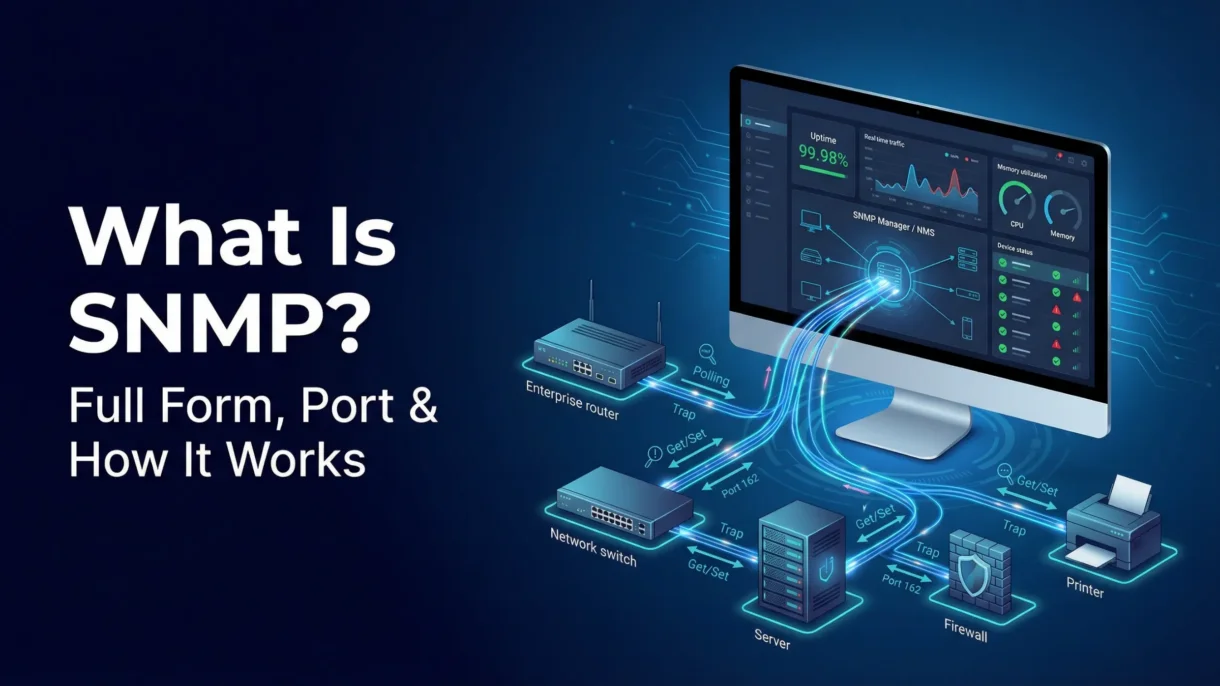
In snmp in computer networks, SNMP works as a network management protocol that connects devices with monitoring tools. These monitoring tools are usually called Network Management Systems (NMS). The NMS collects information from different devices in the network so admins can see the status of everything in one dashboard.
SNMP usually works in two simple ways. First is polling, where the monitoring system regularly asks devices for their status and performance data. The second is event-based alerts, where devices automatically send a message when something important happens, like a failure or high CPU usage. Because of this, admins can quickly know when something is wrong.
SNMP Architecture (Core Components)
SNMP Manager (NMS)
The SNMP Manager is the main monitoring system. It sends requests to devices and collects their data. Network admins use this system to check device health, performance, and alerts in one place.
SNMP Agent
The SNMP Agent is a small software program that runs on network devices. It gathers device information such as memory usage, traffic, and system status. When the SNMP Manager asks for data, the agent sends the required details.
Managed Devices
Managed devices are the actual devices in the network that support SNMP. These can include routers, switches, firewalls, servers, and printers. Since these devices run an SNMP agent, they can share their data with the SNMP Manager for monitoring and management.
SNMP Data: MIB, OID, and What They Mean
In SNMP, devices share their information in a structured way. This is done using something called MIB and OID. These help the monitoring system understand exactly what data it is receiving.
MIB (Management Information Base)
A MIB is like a structured database or a tree of variables. It contains different types of information about a device. Because the data is organized in a standard structure, monitoring tools can easily read and use it.
OID (Object Identifier)
An OID is a unique ID for each piece of information in the MIB. It points to a specific metric such as interface status, CPU usage, or system uptime. Since every metric has its own OID, the monitoring system knows exactly what value it is requesting.
Some simple real examples of SNMP data include interface operational status (whether a port is up or down), device uptime (how long the device has been running), and bandwidth counters that show how much traffic is passing through the device.
How SNMP Works
A) Polling (Manager → Agent)
In most networks, the SNMP Manager regularly asks devices for information. This process is called polling. The manager sends requests such as Get, GetNext, or GetBulk to the SNMP agent running on the device.
The agent then checks its data and replies with the requested values. After that, the Network Management System stores the data and often shows it in graphs or reports. Because of this, admins can see trends, check performance, and set thresholds for alerts.
B) Traps / Notifications (Agent → Manager)
SNMP also supports event-based alerts. If something important happens, the device does not wait for the manager to ask. Instead, it immediately sends a trap or notification.
For example, a trap may be sent when an interface goes down, CPU usage becomes too high, or the device temperature increases. The NMS receives this message and triggers an alert such as an email, Slack message, or a console notification. Thus admins can respond quickly.
SNMP Port Number
The snmp port number used for normal communication is 161. This port is used when the SNMP Manager sends requests to an SNMP agent to collect information from a device.
Another important snmp port number is 162. This port is used for SNMP traps or notifications, which are messages sent from devices to the manager when an event occurs.
One quick thing to note is that SNMP usually runs over UDP. To better understand concepts like port forwarding and how ports work, it helps to know that These port numbers are standardized in the IANA registry, hence most SNMP tools and devices follow the same configuration by default.
SNMP Versions (v1 vs v2c vs v3)
SNMPv1
SNMPv1 is the first version of SNMP. It provides basic monitoring features, but its security is quite weak because it uses something called community strings for access. Since these strings are sent in plain text, they can be easier to intercept, although the version is still seen in some older systems.
SNMPv2c
SNMPv2c is an improved version of SNMPv1. It added better performance and some new commands, thus making network monitoring faster and more efficient. However, it still uses community strings for security, so the protection level is not very strong. Even so, SNMPv2c is still common in many networks because it is simple and widely supported.
https://pmnetworking.in/what-is-dynamic-arp-inspection-and-why-it-is-important-for-network-security/SNMPv3
SNMPv3 is the most secure version. It adds proper authentication and encryption, thereby protecting the data that moves between devices and the monitoring system. Understanding concepts like dynamic ARP inspection and network security can further strengthen how protocols like SNMPv3 protect modern infrastructures. Because of these security features, SNMPv3 is considered the best option for modern networks.
Practical Recommendation
Although older versions are still used in some environments, it is better to use SNMPv3 whenever possible. This is especially important in enterprise networks since it provides stronger security and better control over access.
SNMP Pros and Limitations
Pros
- SNMP works across many vendors. Most networking devices support SNMP, including networking devices like routers and switches, servers, and printers. Because it is a standard protocol, admins can monitor devices from different brands in one system.
- SNMP is lightweight for monitoring. It does not use a lot of system resources, so devices can send their data without affecting normal network performance.
- SNMP uses standardized metrics through MIBs and OIDs. These standard data points make it easier for monitoring tools to collect and understand device information across different systems.
Limitations
- SNMP misconfiguration can create risks. If the settings are not configured properly, unauthorized users might access device information.
- Older versions like SNMPv1 and SNMPv2c have security concerns. They use community strings instead of strong authentication, so the data may not be fully protected.
- Polling too frequently can create extra load. If the monitoring system sends requests too often, it may generate unnecessary traffic or noise in the network. Because of this, admins usually follow best practices when setting polling intervals.
Conclusion
SNMP is an important protocol in computer networking because it helps administrators monitor, manage, and troubleshoot network devices from one central system. It makes it easier to track device health, collect performance data, and receive alerts when issues occur. Since SNMP works across many types of devices and vendors, it remains a widely used solution for network monitoring. However, because older versions have security limitations, SNMPv3 is usually the best choice for modern networks due to its authentication and encryption features.
For those learning networking concepts in depth, topics like SNMP are often covered in a CCNA 200-301 certification course, helping build a strong foundation in network management and security.
FAQs
What is SNMP used for in computer networks?
SNMP is used to monitor as well as manage devices in a network such as routers, switches, and servers. It helps network admins check performance, detect problems and get alerts when any problems arise.
What is SNMP full form and meaning?
The SNMP Full Form is Simple Network Management Protocol. It is a standard protocol used to collect and manage information from network devices.
What is the SNMP port number for polling and traps?
Port 161 is used for Polling which is used by the manager to request data from devices. Port 162 is used for traps or notifications sent from devices to the manager.
Is SNMP TCP or UDP?
SNMP usually works over UDP (User Datagram Protocol). This makes it lightweight as well as faster for network monitoring tasks.
Which SNMP version is best and why?
The best version is SNMPv3 because it provides authentication and encryption which provides better security compared to older versions like SNMPv1 and SNMPv2c.

PM Networking is an emerging leader in the ed-tech space, founded by Praphul Mishra in 2020 with a vision to democratize tech education. The journey of PM Networking began as a YouTube channel with the sole purpose of sharing valuable knowledge in the fields of Networking, Cyber Security, and Cloud Computing. What started as a humble effort to educate has rapidly evolved into a comprehensive online learning platform that caters to the growing demand for specialized IT skills. PM Networking stands out in the crowded ed-tech industry by providing affordable, world-class training tailored to the needs of aspiring IT professionals. The platform is dedicated to equipping learners with the skills and knowledge required to excel in the highly competitive tech industry. Whether it’s Networking fundamentals, advanced Cyber Security protocols, or mastering the complexities of Cloud Computing, PM Networking offers a range of courses designed to cater to different levels of expertise.
0 Comments