


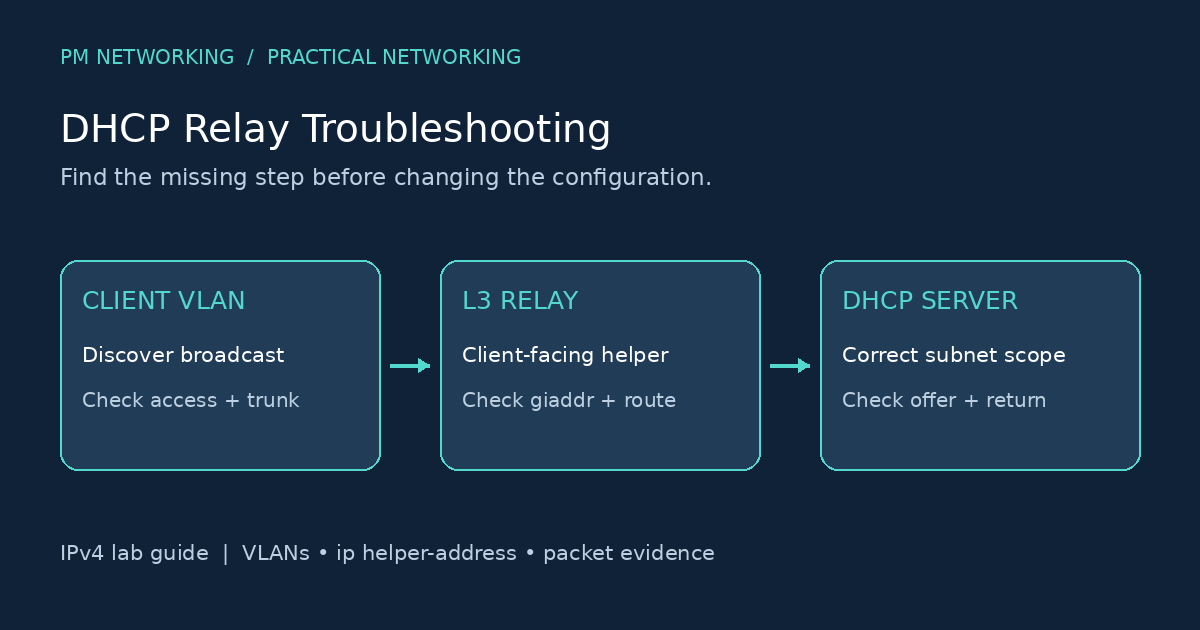
DHCP relay troubleshooting starts by finding where the address request stops. A laptop that cannot obtain an IPv4 address may have a VLAN problem, a missing helper address, an exhausted server scope or a blocked return path. Rebooting the client repeatedly does not distinguish these causes.
This guide uses a small routed lab to organise the checks. It is written for CCNA learners and engineers practising fault isolation. The configuration and expected results are illustrative; they have not been executed on a router emulator for this article. Interface names and supported commands vary by device and software release.
When does a client need DHCP relay?
An initial DHCP broadcast stays within its local broadcast domain. When the server is on another subnet, a relay on the client-facing Layer 3 interface forwards the request. In a conventional numbered-interface design, the relay supplies a gateway address, called giaddr, that helps the server select the client subnet. For the basic message sequence, first read our DORA process explanation.
Example lab: VLAN 10 clients and a remote server
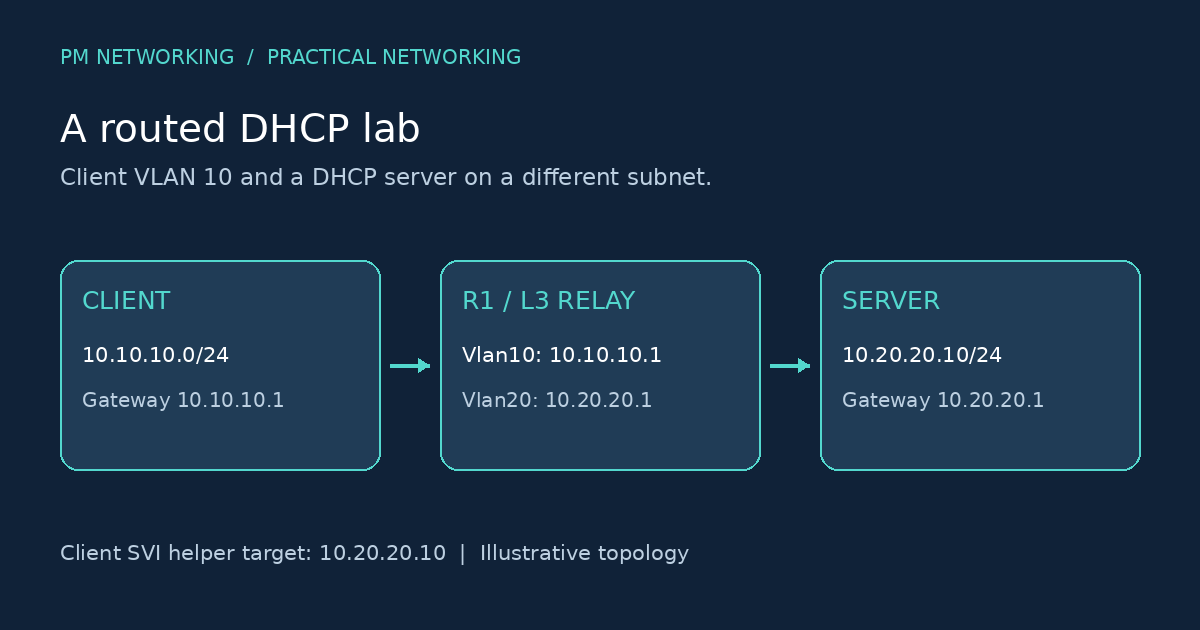
- Client subnet:
10.10.10.0/24, VLAN 10. - Client gateway and relay interface:
10.10.10.1. - Server subnet:
10.20.20.0/24, VLAN 20. - DHCP server:
10.20.20.10, gateway10.20.20.1. - Server scope for clients:
10.10.10.0/24, excluding infrastructure addresses.
The following fragment assumes VLANs, access ports, uplinks and routed interfaces already exist on a suitable Layer 3 switch. It is not a complete switch configuration.
! Illustrative client-facing relay configuration
interface Vlan10
 ip address 10.10.10.1 255.255.255.0
 ip helper-address 10.20.20.10
 no shutdown
!
interface Vlan20
 ip address 10.20.20.1 255.255.255.0
 no shutdown
!
ip routing
The helper belongs on the interface receiving client broadcasts: Vlan10 in this example. Adding it only to the server-facing interface does not fix the client VLAN. Cisco documents this behaviour in its DHCP relay configuration guide.
1. Confirm the symptom and its scope
Record the affected VLAN, client MAC address, time of the last attempt and whether all clients or just one client fail. Compare a working client in the same VLAN with the failing one. A self-assigned address can indicate that a lease was not obtained, but it does not identify the failing device.
Check whether the client is actually configured for automatic addressing. If it already has an address, inspect its subnet mask, gateway, DNS servers and lease details before treating the problem as a relay failure. An incorrect DNS setting can make a healthy lease look like an internet problem.
2. Prove the Layer 2 path to the gateway
show interfaces status
show vlan brief
show interfaces trunk
show ip interface brief
On the relevant switch, check the access VLAN, uplink VLAN allowance and interface state. A configured SVI is not necessarily operational. Investigate the VLAN and active member ports if the client SVI is down. Use the commands supported by your platform and inspect both ends of each uplink.
If the client is in the wrong VLAN, repair that assignment before touching the DHCP server. Our VLAN guide explains the broadcast-domain boundary. A useful lab habit is to draw the exact client-to-gateway path and mark every port where a tagged frame becomes untagged.
3. Check the helper and routed server path
show running-config interface Vlan10
show ip route 10.20.20.10
show ip interface Vlan10
Compare the helper target with the server’s actual address. Check routing and the relevant VRF in both directions. A ping sourced from the client-facing gateway is a useful reachability check when supported, but a successful ICMP test does not prove DHCP UDP traffic is permitted.
Look for an explicit no service dhcp on IOS platforms where that setting disables relay operation. Do not add unrelated global settings by trial and error. With firewalls or ACLs in the path, inspect the actual client, relay and server packet directions rather than applying one blanket port rule.
4. Inspect the server scope and return path
On the server, confirm that the scope matches the client subnet, contains available leases and advertises the intended gateway and DNS values. Examine the request’s relay information and server logs. In the simple lab, the server should identify the VLAN 10 client subnet rather than allocate a VLAN 20 address.
Verify that the server can return traffic to the relay. If the DHCP server is a Cisco IOS device, show ip dhcp pool, show ip dhcp binding and show ip dhcp conflict can help inspect its local service. Those commands on a relay-only device do not describe a separate remote server’s lease database.
5. Follow the packets, not assumptions
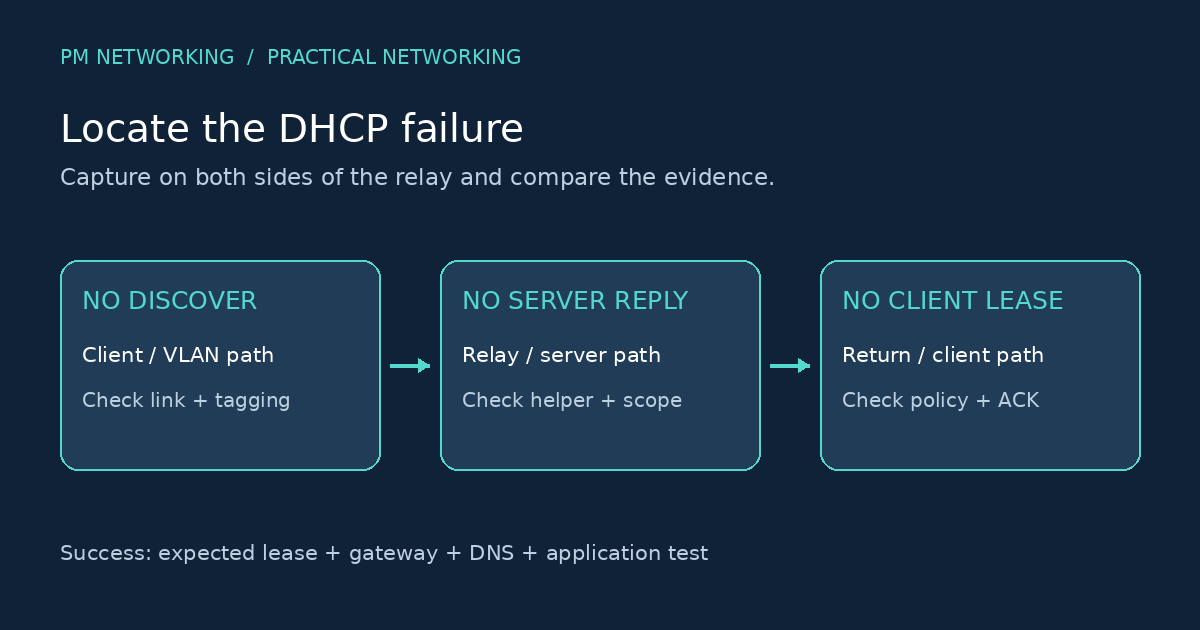
- No Discover near the relay: investigate the client and switching path.
- Request leaves the relay but no reply returns: inspect routing, policy, server receipt and scope selection.
- Offer returns to the relay but not the client: investigate the client-facing path and applicable security features.
- Offer reaches the client but no lease completes: follow Request and ACK as well; an Offer alone is not success.
Where DHCP snooping or Option 82 is in use, compare the configured trust and relay-information policy with the intended design. Do not disable these protections as the default repair. Packet captures should be limited to the affected segment and handled according to your organisation’s procedures.
Practice fault: the helper points to the wrong host
In an isolated copy of this lab, deliberately replace the helper target with an unused address. Before changing it back, write down three observations: whether the Discover reaches R1, where the forwarded request goes and whether any response returns. Restore the intended helper target and repeat the same observations.
Expected learning outcome: the before-and-after evidence should explain why the correction works. Do not claim that a timeout alone proves the server is broken. This exercise is a suggested practice task, not a report of an executed test.
How to verify the repair
- Renew the lease on one test client during an appropriate testing window.
- Confirm an address from the correct subnet, the expected mask, gateway and DNS settings.
- Verify the lease or transaction in the server’s records.
- Test gateway reachability, DNS resolution and an intended application separately.
- Check a second affected client before declaring the VLAN restored.
Keep a short change record containing the symptom, failed stage, correction and evidence. For more structured routing fault-isolation practice, use our CCNP ENARSI lab checklist.
Frequently asked questions
Where should ip helper-address be configured?
On the Layer 3 interface that receives broadcasts from the client subnet. In this lab that is Vlan10, not the server-facing Vlan20.
Does a DHCP server on the same VLAN need relay?
Ordinary same-subnet DHCP communication can take place without a routed relay. First establish whether the client and server really share the same broadcast domain.
Why can I ping the server but still get no lease?
ICMP reachability does not validate DHCP traffic, scope selection or the complete return exchange. Inspect server logs and DHCP packets.
Should the helper address be the gateway or the server?
In this conventional example, the helper target is the DHCP server address, 10.20.20.10. The client gateway is 10.10.10.1.
Is an Offer enough to confirm DHCP works?
No. Verify that the lease completes and the client receives the intended addressing options, then test the required connectivity.
Technical references
For protocol details and platform-specific behaviour, see RFC 2131: Dynamic Host Configuration Protocol and Cisco’s enterprise DHCP troubleshooting documentation. Check the documentation for your own hardware and software before applying a configuration.

PM Networking is an emerging leader in the ed-tech space, founded by Praphul Mishra in 2020 with a vision to democratize tech education. The journey of PM Networking began as a YouTube channel with the sole purpose of sharing valuable knowledge in the fields of Networking, Cyber Security, and Cloud Computing. What started as a humble effort to educate has rapidly evolved into a comprehensive online learning platform that caters to the growing demand for specialized IT skills.PM Networking stands out in the crowded ed-tech industry by providing affordable, world-class training tailored to the needs of aspiring IT professionals. The platform is dedicated to equipping learners with the skills and knowledge required to excel in the highly competitive tech industry. Whether it’s Networking fundamentals, advanced Cyber Security protocols, or mastering the complexities of Cloud Computing, PM Networking offers a range of courses designed to cater to different levels of expertise.
0 Comments