





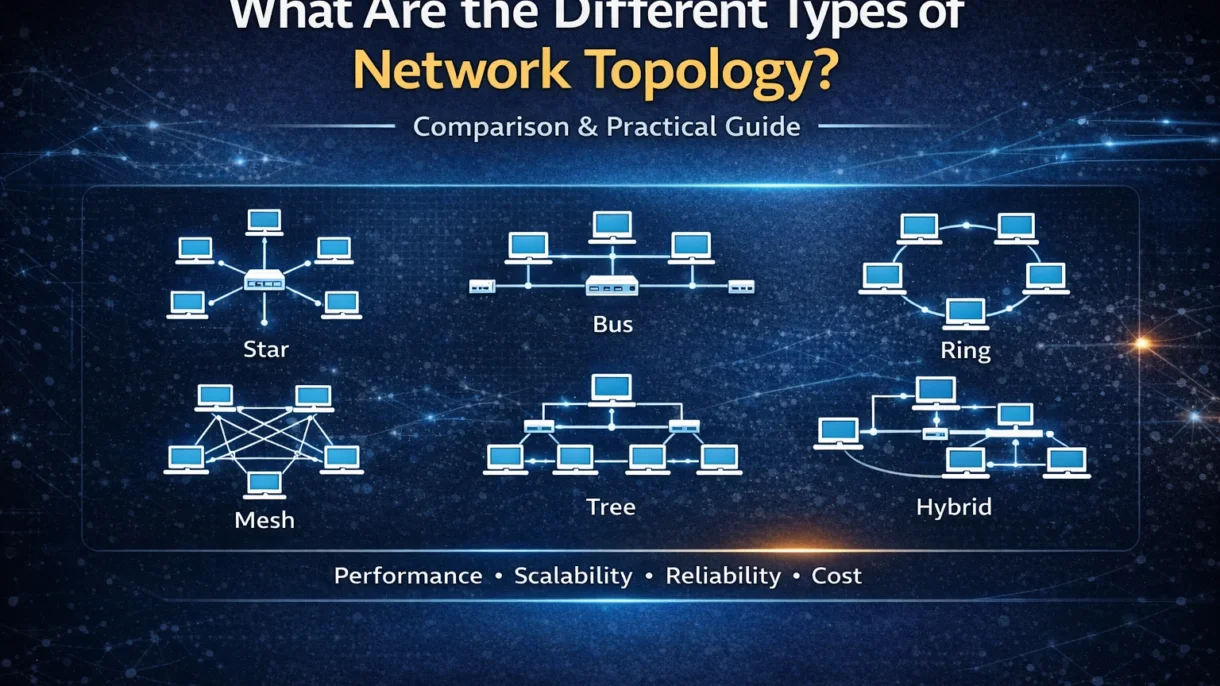
There are many types of network topology, each with its own physical and logical layout. Physical topology shows how devices are physically connected with cables and hardware, while logical topology shows how data flows through the network. Understanding these types helps you design a network that’s right for your needs.
Understanding different types of network topology is important because they affect performance, scalability, reliability, and even cost. A good setup keeps things running smoothly, makes it easier to expand as your needs grow, and reduces the risk of downtime. Read on to learn about what network topology really means and how the main types compare, so you can make smarter decisions for your network.
What Is Network Topology?
In simple words, network topology means the layout or structure of a network. It basically shows how computers, servers, and other devices are connected to each other. It also explains how data moves between them. Although it may sound technical but it’s really just about how everything is arranged and linked together.
There are two main types: physical network topology and logical topology. Physical topology shows how devices are physically connected with cables and hardware. Logical topology, on the other hand, shows how data actually travels through the devices, regardless of the way that the devices are physically connected. So although the wires may be arranged one way, the data might travel in another way.
Why Network Topology Is Important
Network topology designs affect performance and speed. Data moves faster and more smoothly if the structure is simple as well as well planned. However, if the layout is poorly designed or overloaded, it could cause the network to slow down, especially when many devices are connected.
It also affects how easy or difficult troubleshooting can be. In some types of network topology, finding a problem is quick and simple. And in others, it can take more time because one small issue may affect the whole system.
Cost is another important factor. The chosen network topology determines how much you spend on cables, devices, setup, and maintenance. Some designs are cheaper at the start, but may cost more later because of repairs or upgrades.
Scalability and fault tolerance are also influenced by network topology. A good structure makes it easier to add more devices as your business grows. Some types of network topology also keep working even if one connection fails, thereby reducing downtime and improving reliability.
Types of Network Topology
Below are the most common types of network topology.
Point-to-Point network topology
Point-to-point topology is the simplest types of network topology. It connects two devices directly with one link.
How it works
Data travels back and forth between the two devices through a single connection. The communication is quick and clear since there are only two devices involved.
Advantages
It is easy to install and it is simple to maintain. Also, since there are no extra devices in between, the connection is usually very secure and reliable.
Disadvantages
It can only connect two devices, and, therefore, it is not suitable for large networks. If the connection fails, communication is instantly interrupted
Common use cases
It is often used for direct connections like linking two computers or connecting a computer to a printer.
Bus network topology
Bus topology is a types of network topology where all devices connect to a single main cable.
Structure explanation
There is one central backbone cable, and every device is attached to it. Data travels along this cable until it reaches the right device.
Advantages
It is low cost and easy to install. It also requires less cable compared to other designs.
Disadvantages
If the main cable fails, the whole network stops working. Performance can also slow down when many devices are connected.
Where it’s typically used
It was commonly used in small networks and early computer labs, although it is less common today.
Star network topology
Star topology is one of the most popular types of network topology. All devices connect to a central hub or switch.
Central hub/switch explanation
Every device sends data to the central hub, which then forwards it to the correct device. So the hub acts like a traffic controller.
Advantages
It is easy to manage and troubleshoot. If one device fails, the rest of the network keeps working.
Disadvantages
If the central hub fails, the whole network goes down. It also costs more than bus topology.
Real-world applications
Most modern office and home networks use star topology because it is reliable as well as easy to expand.
Ring Topology
In ring network topology, devices are connected in a circular shape.
Data transmission method
Data is transferred only in a single direction around the ring until it reaches the correct device. Each device passes the data to the next one.
Advantages
It grants similar access to every device and reduces data collisions.
Disadvantages
A single device or connection can impact the whole network in case it fails. It can also be more difficult to troubleshoot.
Use cases
It is sometimes used in small networks or specialized systems where orderly data flow is needed.
Mesh Topology
Mesh topology is a types of network topology where devices are connected to multiple other devices.
Full mesh vs partial mesh
In a full mesh, each device is connected with all the other devices. In a partial mesh, only some devices have multiple connections.
Advantages
It is very reliable since data have numerous paths. Even if one connection fails, data can travel another way.
Disadvantages
It is expensive and complex to set up. It also requires more cables and hardware.
Enterprise use cases
Mesh topology is commonly used in large companies and data centers since reliability and uptime are crucial factors.
Tree Topology
Tree topology combines features of star and bus topologies.
Hierarchical structure explanation
It has a main backbone, and smaller star networks branch out from it, creating a tree-like structure.
Advantages
It is scalable and easy to expand. It also helps organize large networks clearly.
Disadvantages
If the main backbone fails, many devices can be affected. It also requires more cabling.
When it’s ideal
It is ideal for large organizations like universities or big offices with multiple departments.
Hybrid Topology
Hybrid topology combines two or more different types of network topology into one system.
Combination of topologies
For example, a company may use star topology in one department and mesh in another, depending on their needs.
Advantages
It is flexible and highly scalable. It also allows businesses to design a network that fits their exact requirements.
Disadvantages
It can be complex and costly to design and maintain.
Enterprise implementation examples
Large enterprises often use hybrid topology because it gives them both reliability and flexibility, although it requires careful planning.
Comparison of Types of Network Topology
| Topology | Cost | Scalability | Reliability | Installation Complexity | Maintenance Difficulty | Best Use Case |
| Point-to-Point | Very Low | Very Low | High (for 2 devices) | Very Easy | Very Easy | Direct link between two devices |
| Bus | Low | Low | Medium | Easy | Medium | Small networks/labs |
| Star | Medium | Good | High | Medium | Easy | Office and home networks |
| Ring | Medium | Medium | Medium | Medium | Medium | Small, orderly networks |
| Mesh | High | Excellent | Very High | Complex | High | Large enterprises as well as data centers |
| Tree | Medium | Good | Medium | Medium | Medium | Large organizations with departments |
| Hybrid | High | Excellent | Very High | Complex | High | Large enterprises needing flexibility |
This table shows that no single network topology is perfect. Some are cheap but less reliable, while others are expensive but very robust. Choosing the right one depends on your budget, size, and how critical uptime is for your network.
How to Choose the Right Type of Network Topology
Choosing the right network topology doesn’t have to be hard. Here are some simple things to consider.
Network size
If you have just a few devices, simple topologies like point-to-point or bus may work. For bigger networks, star, tree, or hybrid topologies are usually better because they handle more devices easily.
Budget considerations
Some topologies cost more to set up and maintain, like mesh or hybrid. In case you have a limited budget, star or bus topology can be a good option since they are less expensive but still reliable.
Required performance level
If you need a network that is fast and handle lots of data, choose a topology that facilitate easy flow of data like star or mesh. Some simpler layouts can slow down when too many devices are connected.
Fault tolerance requirements
Consider the failure of a device or of a connection. Mesh and hybrid topologies are great for networks that need to stay running all the time. Simpler topologies like bus can stop working if one cable fails.
Future scalability
Your network may grow over time. Topologies like star, tree, and hybrid make it easier to add more devices without rebuilding the network. Choosing a scalable design now saves headaches later.
Common Mistakes When Designing Network Topology
Designing a network topology is not always an easy task, and people often make mistakes that cause problems later.
Ignoring scalability
Some networks perform well initially but fail to support more devices later. Not thinking about future growth can lead to expensive upgrades.
Overcomplicating the design
Adding too many connections or using a complex topology when it’s not needed can make it more difficult to manage as well as troubleshoot.
Not planning redundancy
If there’s no backup path for data, a single failure can stop the whole network. Always plan for fault tolerance to avoid downtime.
Budget miscalculations
Some topologies cost more than expected to install or maintain. Not planning for these costs can lead to overspending or a poorly performing network.
Conclusion
We’ve now gone through the main types of network topology: point-to-point, bus, star, ring, mesh, tree, and hybrid. Each has its own advantages, disadvantages, and ideal use cases.
Remember, the right topology depends on your business goals, budget, and future growth plans. What works for a small office may not suit a large enterprise.
Planning your network carefully before setting it up is very important. A well-chosen topology keeps your network fast, reliable as well as easy to manage as your business grows.
Also Read: Star Topology Advantages and Uses
FAQs
What are the 7 types of network topology?
The seven main types are the following: point-to-point, bus, star, ring, mesh, tree, and hybrid. Each has its own way of connecting devices and handling data.
Which topology is most reliable?
Mesh and hybrid topologies are considered the most reliable because they have multiple paths for data. And even if one connection fails, the network doesn’t stop working.
Which topology is cheapest?
Point-to-point and bus topologies are usually the cheapest to set up because they use fewer cables and devices.
Which topology is best for large organizations?
Hybrid and tree topologies are ideal for large organizations due to the fact that they are scalable, flexible, and can also handle many devices without slowing down.

PM Networking is an emerging leader in the ed-tech space, founded by Praphul Mishra in 2020 with a vision to democratize tech education. The journey of PM Networking began as a YouTube channel with the sole purpose of sharing valuable knowledge in the fields of Networking, Cyber Security, and Cloud Computing. What started as a humble effort to educate has rapidly evolved into a comprehensive online learning platform that caters to the growing demand for specialized IT skills. PM Networking stands out in the crowded ed-tech industry by providing affordable, world-class training tailored to the needs of aspiring IT professionals. The platform is dedicated to equipping learners with the skills and knowledge required to excel in the highly competitive tech industry. Whether it’s Networking fundamentals, advanced Cyber Security protocols, or mastering the complexities of Cloud Computing, PM Networking offers a range of courses designed to cater to different levels of expertise.
0 Comments