


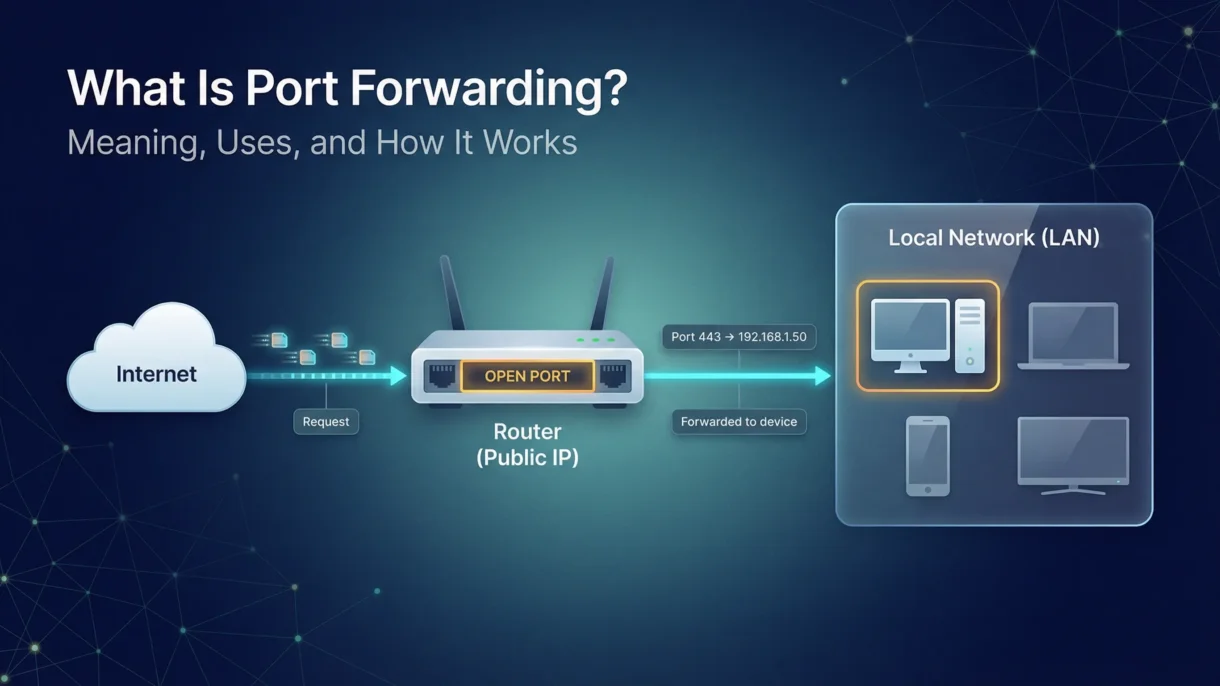
When we use the internet at home or in the office, our devices are usually connected to a private network. This network is protected by a router, which acts like a gatekeeper. It controls what comes in and what goes out. Port forwarding is a method that allows certain outside requests to pass through that gate and reach a specific device inside the network.
When we use the internet at home or in the office, our devices are usually connected to a private network. This network is protected by a router, which acts like a gatekeeper. If you are setting up a proper network, it also helps to understand the right networking components (like router, switch, and firewall) for your needs. It controls what comes in and what goes out. Port forwarding is a method that allows certain outside requests to pass through that gate and reach a specific device inside the network.
In simple words, port forwarding is a way to let someone from outside your network connect to a device inside your network. It is useful, but it must be set up carefully because it can also create security risks.
What Does Port Forwarding Mean?
Port forwarding is a networking technique that redirects internet traffic from one address and port number to another inside a private network. Every device connected to the internet uses ports, which are like virtual doors. These doors allow different types of data to enter and leave.
If you go on an internet site your browser typically uses Port 80 or Port 443 / TLS handshake to access it. These ports handle web traffic. Port Forwarding works by telling the router that “If someone tries to connect through this specific port, send them to this specific device inside the network.”
Although this sounds technical, the idea is very simple. It is like telling a receptionist in an office building to send all calls for a certain department to one specific room.
How Does Port Forwarding Work?
Port forwarding works in a step-by-step way.
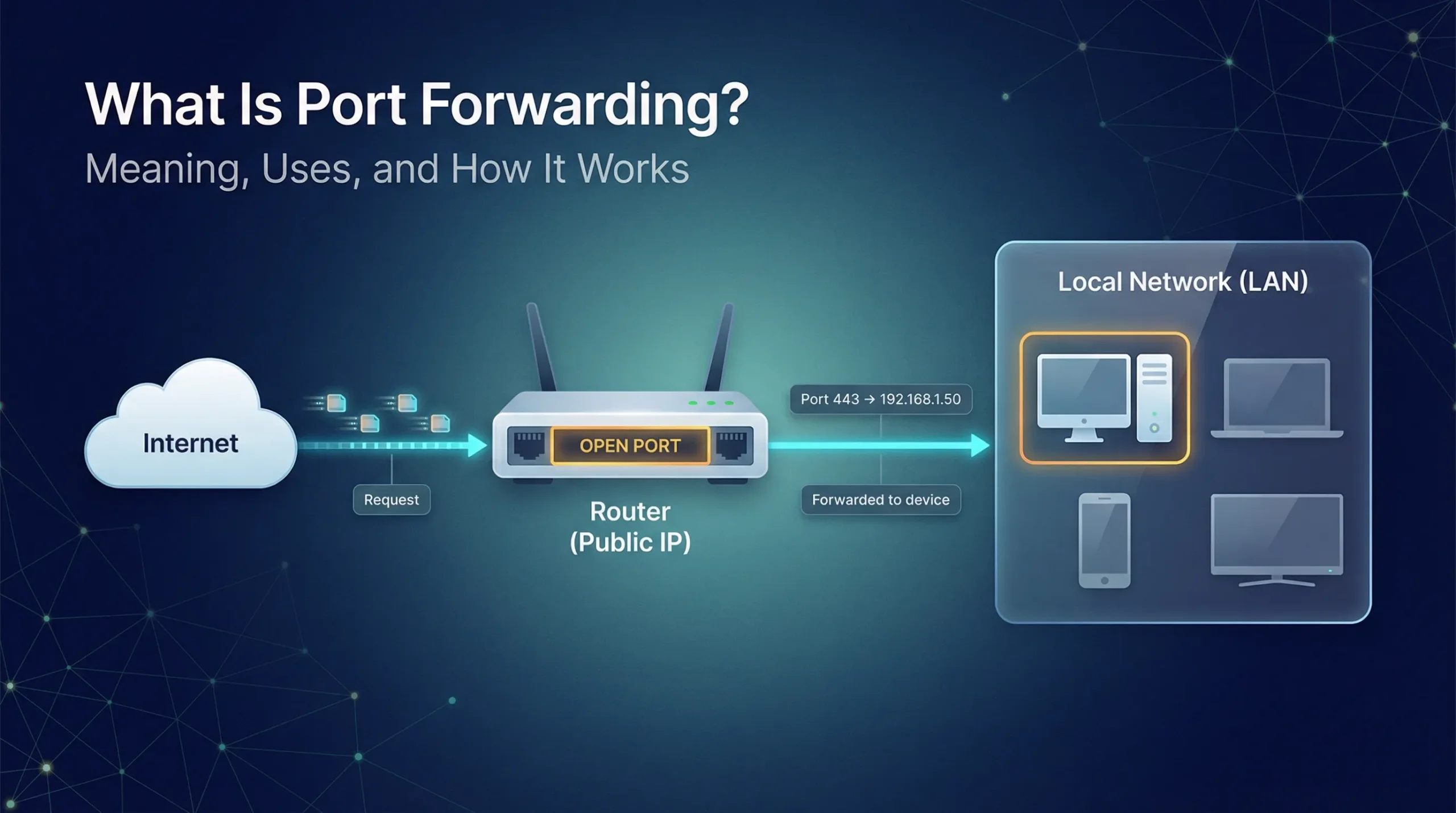
The first step involves someone outside your network trying to connect to your public IP address using a specific port number. The external client sends this request through the internet to the router connected to your internal network. This process is closely related to NAT in networking, because the router manages how public internet traffic is mapped to private (local) devices.
After receiving this request, the router checks its settings. If port forwarding has been configured for the requested port, the router will know which internal device should receive that request. It then forwards the traffic to the correct local IP address and port.
The device inside your network receives the request and responds. The router sends that response back to the external user. Once the connection is established, the communication continues through the same mapped port.
Because of this setup, people can access devices like home computers, servers, security cameras, or gaming consoles from outside the network.
Types of Port Forwarding
There are three main types of port forwarding. Each one serves a different purpose.
Local Port Forwarding
Local port forwarding is used when you want to access a remote service from your own device. It forwards traffic from your local machine to another server. This is often used to bypass certain network restrictions or firewalls.
Remote Port Forwarding
Remote port forwarding allows someone from outside your network to access a service inside your local network. For example, if you are running a web server at home, remote port forwarding lets users on the internet connect to it.
Dynamic Port Forwarding
Dynamic port forwarding is more flexible. It creates a secure tunnel that can handle multiple ports. It is often used with VPN connections, since it allows secure access to different services through one connection.
Although these types sound complex, they all follow the same basic idea: redirecting traffic from one port to another.
Why Is Port Forwarding Used?
Port forwarding is commonly used for remote access. People use it to connect to their home computers, office systems, or servers while traveling. It is also used for online gaming, hosting websites, accessing security cameras, and running certain applications.
For example, small businesses sometimes set up port forwarding to allow remote desktop access to office computers. Gamers may forward specific ports to improve connection performance in multiplayer games.
It is helpful because it gives direct access to devices inside a private network. However, this direct access can also create risks.
Security Risks of Port Forwarding
Though port forwarding can offer a lot of advantages, there are potential risks associated with using it improperly. Since you are opening a “door” from the internet into your private network, there is a chance that malicious hackers may try to exploit that door in some way.
In addition, if the connected device has weak passwords and/or outdated software, it can become an easy target. Because the port is exposed to the internet, automated attacks can scan and attempt to break in.
Therefore, while port forwarding allows convenience, it also increases exposure at the same time. This is the reason why many security experts recommend safer remote access methods when possible.
Final Thoughts
Port forwarding is a way to allow external devices to connect to devices inside a private network. It works by redirecting traffic from a public IP address and port to a specific local device.
Port forwarding is a great option for remote access, gaming, hosting services and connecting to home systems. However, port forwarding also creates security risks because it opens a path into your network.
Since security is very important nowadays, many people prefer secure remote access tools over traditional port forwarding. Although both methods allow remote connections, secure solutions provide stronger protection as well as easier setup.
In simple terms, port forwarding opens a door to your network. It can be helpful, but it must be handled carefully.
FAQs
1. Is port forwarding safe to use?
Port forwarding can be safe if set up properly with strong passwords and updated software. However, it can be risky because it opens a path from the internet to your device.
2. Why do people use port forwarding?
People use it to access devices like home computers, security cameras, or game servers from outside their network. It helps them connect remotely when they are not at home or in the office.
3. Do I need port forwarding for remote access?
Not always, because many modern remote access tools work without it. These tools are often easier to set up as well as more secure.
4. Can port forwarding slow down my internet?
No, it usually does not do that by itself. However, too many open ports or heavy traffic can affect performance.
5. How do I set up port forwarding?
You usually set it up in your router settings by choosing a port number and linking it to a specific device on your network. The steps may vary depending on your router, but the idea is to map an outside request to an inside device.

PM Networking is an emerging leader in the ed-tech space, founded by Praphul Mishra in 2020 with a vision to democratize tech education. The journey of PM Networking began as a YouTube channel with the sole purpose of sharing valuable knowledge in the fields of Networking, Cyber Security, and Cloud Computing. What started as a humble effort to educate has rapidly evolved into a comprehensive online learning platform that caters to the growing demand for specialized IT skills. PM Networking stands out in the crowded ed-tech industry by providing affordable, world-class training tailored to the needs of aspiring IT professionals. The platform is dedicated to equipping learners with the skills and knowledge required to excel in the highly competitive tech industry. Whether it’s Networking fundamentals, advanced Cyber Security protocols, or mastering the complexities of Cloud Computing, PM Networking offers a range of courses designed to cater to different levels of expertise.
0 Comments